

Box contents
|
OPS-M = OPS5-yPyyRyyyS
|
TP-3317 |
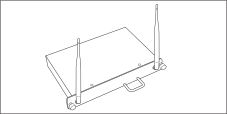 x1
x1 x1
x1Interface
The front face of OPS‑M5
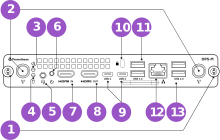
The rear face of OPS‑M5
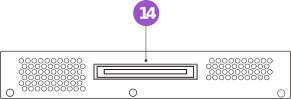
|
Number |
Feature |
Description |
|
|
1 |
Thumbscrew |
Secures OPS‑M5 to ActivPanel |
|
|
2 |
Antenna |
Wi-Fi antenna interface |
|
|
3 |
Power LED |
Power indicator light (green) |
|
|
Light state |
OPS‑M5 condition |
||
|
Off |
Sleep or standby |
||
|
On |
On |
||
|
4 |
Status LED |
Hard drive indicator light (red) |
|
|
Light state |
OPS‑M5 condition |
||
|
Off |
Idle |
||
|
Flashing |
Active read/write |
||
|
5 |
Audio out |
Outputs audio to speakers or headphones |
|
|
6 |
Power button |
Turns the OPS‑M5 on / off |
|
|
7 |
HDMI in |
Video / audio input |
|
|
8 |
HDMI out |
Video / audio output |
|
|
9 |
2 × USB-C (DP out) |
DisplayPort video output |
|
|
10 |
Kensington lock |
Anti-theft cable slot |
|
|
11 |
USB-A 3.2 |
USB 3.2 port |
|
|
12 |
LAN |
Wired network connection |
|
|
13 |
USB-A 2.0 |
USB 2.0 port |
|
|
14 |
OPS connector |
Connects OPS‑M5 to ActivPanel |
|
Installing OPS‑M5 with ActivPanel
|
1 |
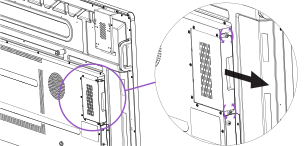
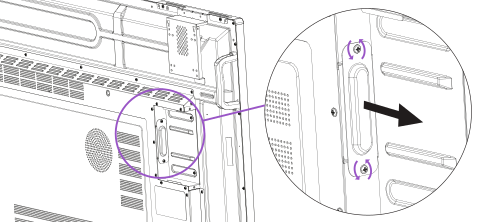
From the side of ActivPanel, remove the OPS cover by unscrewing two screws. |
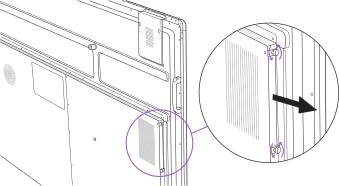
|
2 |
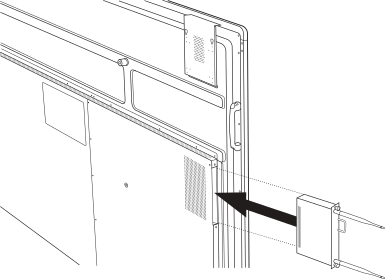
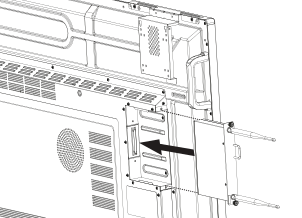
Slide OPS‑M5 into the slot on the side of ActivPanel. |
|
3 |
Tighten the OPS‑M5 thumbscrews on the side of ActivPanel. |
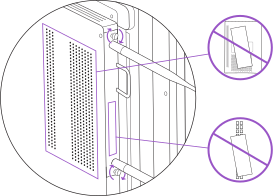
Warning: Do not cover the OPS‑M5 venting holes.
Using OPS‑M5 with ActivPanel
|
1 |
Press the Source button on ActivPanel. |
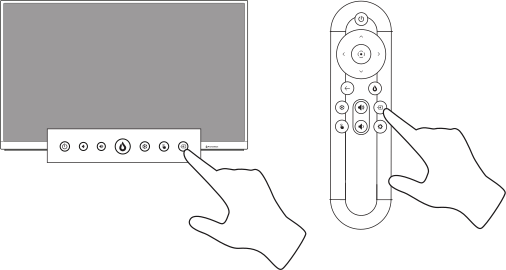
|
2 |
From the ActivPanel source menu, select OPS. |
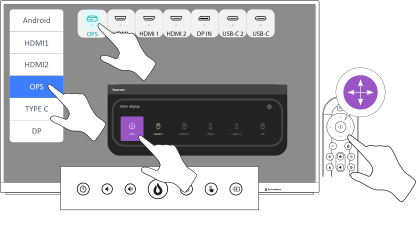
Accessibility
-
For detailed accessibility features of Microsoft Windows 11, please refer to Microsoft’s official Windows Accessibility documentation. Microsoft, as the operating system provider, is best positioned to document OS-level accessibility. Promethean provides system-level support and accessibility guidance for the complete OPS solution as delivered. For more information, go to Windows 11 accessibility features or search for "Discover Windows 11 accessibility".
Accessibility conformance reports
-
To view OPS‑M5's USA Section 508 accessibility and EU / Canada EN301 549 VPAT report, visit the Promethean website or use the following QR code.

-
This product operates on the Microsoft Windows 11 operating system. Accessibility information for Windows 11 is available from Microsoft. Promethean accepts no representations regarding the accessibility of third-party operating systems or software. For more information, go to Windows accessibility conformance reports, search for "Windows 11 accessibility conformance reports", or use the following QR code:

Safety
Read and understand all safety information, operating instructions, and product labels before operating the equipment. Keep this guide in a safe place for future reference.
The lightning flash with arrow-head symbol, within an equilateral triangle, is intended to alert the user to the presence of “dangerous voltage” within the product’s enclosure that may be sufficient to constitute a risk of electric shock to persons.
The exclamation mark within a triangle is intended to alert the user to the presence of important operating and maintenance (servicing) instructions.
WARNING
To reduce the risk of fire or electric shock, do not expose this product to smoke, rain, dust or moisture.
WARNING
To reduce the risk of electric shock, do not remove cover (or back). No user-serviceable parts inside. Refer servicing to qualified service personnel.
-
This product is designed and manufactured to operate within defined design limits, and misuse may result in electric shock or fire.
-
The installation of this product should be completed by a Promethean Trained Installer.
-
Use of components not supplied by Promethean or not meeting minimum specifications may impact performance and affect the warranty. For Promethean Warranty Terms and Conditions, please visit www.PrometheanWorld.com/ActivCare
Safety information - OPS‑M5
-
Inspect the product for any physical damage to the casing before use. If damage is apparent, take care to avoid contact with any potentially live parts.
-
Do not under any circumstances try to gain access to internal parts of the product. If you suspect that the device is damaged or faulty, you should contact Technical Support, or an authorised Promethean service agent for advice.
-
To avoid the risk of electric shock or component damage, disconnect the OPS‑M5 from the power supply before removing the product.
-
The ventilation holes in the housing are designed to protect the product against overheating. Be careful not to block them.
-
Do not insert hands or any other objects into the ventilation holes or signal joints of the product.
-
Never place, spill or pour any liquid on any part of the product. The product could short circuit causing a fire or electric shock.
-
Do not place the product in front of an air conditioning unit to avoid condensation which could cause fire, electric shock or component damage.
-
Do not put the product on or beside any radiator or heater.
-
Do not put any flammable or explosive objects near the product.
-
Always use accessories recommended by Promethean to ensure compatibility.
-
To avoid the risk of electric shock or component damage ensure the panel is disconnected from the power supply before plugging any cables into the product.
-
Do not use any liquid or a spray cleaner when wiping the device. Use a slightly damp cloth. Never use any alcohol-, solvent-, or ammonia-based liquid when wiping the screen. Do not use abrasive cleaners.
-
When moving the product from an area of low temperature to one of high temperature, condensation may form on the housing. Do not power on the device immediately after this to avoid causing fire, electric shock or component damage.
WARNING
Excessive sound pressure from earphones and headphones can cause hearing loss.
If any of the following occurs, please contact Technical Customer Support:
-
Liquid sprays, or any object drops, into the product.
-
The product is dropped or damaged in any way.
-
The product emits abnormal sounds.
-
The product emits smoke or odour.
-
The performance of the product changes substantially.
WARNING
RISK OF EXPLOSION IF BATTERY IS REPLACED BY AN INCORRECT TYPE. DISPOSE OF USED BATTERY ACCORDING TO THE INSTRUCTIONS.
Battery types
|
Model number |
Battery type |
|---|---|
|
OPS5-yPyyRyyyS |
CR2032 |
-
Incorrect polarity of batteries may cause damage or leakage of the batteries, operating injury, and contamination.
-
If you think batteries might have been swallowed or placed inside any part of the body, seek immediate medical attention.
-
Dispose of batteries according to the local laws and regulations of your region, or contact your Promethean reseller.
-
OPS5-yPyyRyyyS must only be connected to a USB interface of version USB2.0/USB3.0.
-
OPS5-yPyyRyyyS belong to receiver category 1.

Environmental considerations
Temperature:
-
Operating: 0°C (32°F) to +40°C (104°F)
-
Storage: -20°C (-4°F) to +60°C (140°F)
Relative Humidity (non‑condensing):
-
Operating: 10% to 90%
-
Storage: 10% to 90%
Weight
-
Net weight: 1.0 kg
Possible malfunctions and ways to eliminate them
Ensure quick start guide is read before installation. Should an issue occur, please contact your Promethean representative or Promethean support.
Sale and disposal
Old electrical and electronic equipment and batteries should be recycled at a facility capable of handling these items and their waste by-products. Contact your local authority for details in locating a recycling facility near you. Prevent the negative environmental effects of sending often hazardous electrical equipment to landfill. Products and batteries with the WEEE symbol must not be disposed as household waste.
Warranty registration and support

For warranty information, go to https://registration.prometheanworld.com/
Certification and compliance
OPS5-yPyyRyyyS
OPS5-yPyyRyyyS (y can be 0-9, A-Z, a-z, "-" or blank)
Copyright information
TP-3318 ©2026 Promethean Limited. All rights reserved.
Promethean is owner of a number of trademarks in several jurisdictions across the world. The Promethean products documented in this guide include aspects which are protected under their respective patent, copyright, design copyright, registered design and trademark laws.
|
|
The terms HDMI, HDMI High-Definition Multimedia Interface, HDMI trade dress and the HDMI Logos are trademarks or registered trademarks of HDMI Licensing Administrator, Inc. |

VESA is a registered mark of Video Electronics Standards Association.
Apple is a trademark or registered trademark of Apple, Inc. in the United States and other countries. Windows is a registered trademark or trademark of Microsoft Corporation in the United States and other countries. Linux is a registered trademark of Linus Torvalds in the United States and other countries.
All other trademarks remain the property of their respective owners.
This guide is distributed online. It may only be reproduced for use within the institution in which the product is used. For use outside of your institution, no part of this guide may be reproduced, transmitted, stored in a retrieval system or translated into any other language without the prior permission of Promethean Limited.
Please note that the content in this guide is protected under copyright law. Although every care has been taken in the compilation of this guide, Promethean Limited accepts no responsibility for errors or omissions, or for damages resulting from the use of information contained within this guide.
Compliance
United States of America
This equipment has been tested and found to comply with the limits for a Class B digital device, pursuant to part 15 of the FCC Rules. These limits are designed to provide reasonable protection against harmful interference when the equipment is operated in a commercial environment. This equipment generates, uses, and can radiate radio frequency energy and, if not installed and used in accordance with the instruction manual, may cause harmful interference to radio communications. Operation of this equipment in a residential area is likely to cause harmful interference in which case the user will be required to correct the interference at his own expense.
Do not make any changes or modifications to the equipment.
Canada
This Class B digital apparatus complies with Canadian ICES-003.
Cet appareil numérique de la classe B est conforme à la norme NMB-003 du Canada.
Europe
We Promethean Limited, declare under our Sole responsibility that the OPS5-yPyyRyyyS conforms to the essential requirements of European Union Directives 2014/53/EU Radio Equipment Directive (RED), 2014/30/EU Electromagnetic Compatibility Directive, 2014/35/EU Low Voltage Directive and 2011/65/EU Restriction of Hazardous Substances in Electrical and Electronic Equipment. Full Declaration of Conformity can be found by searching for the model number at https://www.prometheanworld.com/docs/declaration-of-conformity.
WARNING
OPS5-yPyyRyyyS is a Class B Product. In a domestic environment, it may cause radio interference in which case the user may be required to take adequate measures.
United Kingdom
We, Promethean Limited declare under our sole responsibility that the OPS5-yPyyRyyyS conforms to the essential UKCA requirements 2016 No:1091 Electromagnetic Compatibility regulations 2016, 2016 No:1101 Electrical Equipment Safety Regulation 2016, 2017 No:1206 The Radio Equipment Regulation 2017, and UK SI 2016 No:1091, RoHS Restriction of the use of certain Hazardous Substances in Electrical and Electronic Regulations 2012 – UK SI 2012 No:3032.
WARNING
OPS5-yPyyRyyyS is a Class B Product. In a domestic environment, they may cause radio interference in which case the user may be required to take adequate measures.
Waste Electrical and Electronic Equipment (WEEE)
For more information concerning the correct disposal of these products, please contact your Promethean reseller.
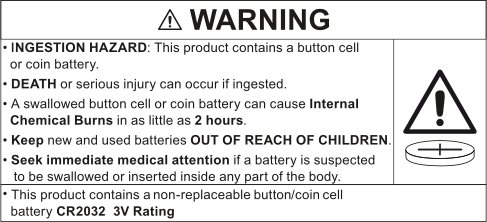
-
Product contains non-replaceable RTC coin battery model: CR2032, 3V Rating.
-
Remove and immediately recycle or dispose of used batteries according to local regulations and keep away from children. Do NOT dispose of batteries in household trash or incinerate.
-
Even used batteries may cause severe injuries or death.
-
Call a local poison control center for treatment information.
-
Non-rechargeable batteries are not to be charged.
-
Do not force discharge, recharge, disassemble, heat above 40°C (104°F) or incinerate. Doing so may result in injury due to venting, leakage, or explosion resulting in chemical burns.
-
Keep new and used batteries away from children.
-
The coin battery can cause severe or fatal injuries in 2 hours or less if it is swallowed or placed inside any part of the body.
Wi‑Fi module
OPS5-yPyyRyyyS incorporates a Wi-Fi module. See compliance label for details of the fitted Wi-Fi module.
United States of America
Model No: OPS5-yPyyRyyyS is an open cell personal computer to be used with UL listed panels that have installations detailing user installation and card cage accessories.
This equipment has been tested and found to comply with the limits for a Class B digital device, pursuant to Part 15 of FCC Rules. These limits are designed to provide reasonable protection against harmful interference in a residential installation. This equipment generates, uses, and can radiate radio frequency energy. If not installed and used in accordance with the instructions, it may cause harmful interference to radio communications. However, there is no guarantee that interference will not occur in a particular installation. If this equipment does cause harmful interference to radio or television reception, which can be determined by turning the equipment off and on, the user is encouraged to try and correct the interference by one or more of the following measures:
-
Reorient or relocate the receiving antenna.
-
Increase the distance between the equipment and the receiver.
-
Connect the equipment to outlet on a circuit different from that to which the receiver is connected.
-
Consult the dealer or an experienced radio/TV technician for help.
-
Any changes or modifications not expressly approved by the party responsible for compliance could void the user’s authority to operate the equipment.
This device complies with part 15 of the FCC rules. Operation is subject to the following two conditions:
-
This device may not cause harmful interference; and
-
This device must accept any interference received, including interference that may cause undesired operation.
Canada
Canada – Industry Canada (IC)
Model No: OPS5-yPyyRyyyS is an open cell personal computer to be used with CUL listed panels that have installations detailing user installation and card cage accessories.
This device complies with RSS 210 of Industry Canada.
Operation is subject to the following two conditions:
-
this device may not cause interference
-
this device must accept any interference, including interference that may cause undesired operation of this device.
Modèle no: OPS5-yPyyRyyyS est un ordinateur personnel portable ouvert pour être utilisé avec UL panneaux qui ont des instructions d’installation détaillant l’installation de l’utilisateur d’accessoires carte de cage.
Cet appareil est conforme aux CNR exemptes de licence d'Industrie Canada. Son fonctionnement est soumis aux deux conditions suivantes:
-
Ce dispositif ne peut causer d'interférences; et
-
Ce dispositif doit accepter toute interférence , y compris les interférences qui peuvent causer un mauvais fonctionnement de l'appareil.
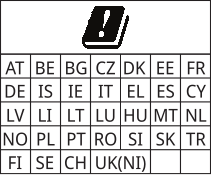
Europe

OPS5-yPyyRyyyS
|
Type |
Frequency (GHz) |
Max power (dBm) |
|
|
BT |
2.4 |
14.8 |
|
|
Wi‑Fi |
2.4 |
17.0 |
|
|
Wi‑Fi |
5 |
18.0 |
|
|
Wi‑Fi |
6 |
17.9 |
United Kingdom

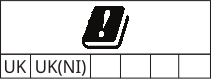
OPS5-yPyyRyyyS
|
Type |
Frequency (GHz) |
Max power (dBm) |
|
|
BT |
2.4 |
14.8 |
|
|
Wi‑Fi |
2.4 |
17.0 |
|
|
Wi‑Fi |
5 |
18.0 |
|
|
Wi‑Fi |
6 |
17.9 |
OPS5-yPyyRyyyS is for internal use only.
WARNING
This device complies with RF specifications when the device is used at 20 cm from your body.
Promethean Ltd, Part First Floor, The Weaving Shed Business Centre, Greenacre Street, Clitheroe, BB7 1EB, UK